

FAB Online Banking
FAB online banking is the internet-based banking solution for the day-to-day banking operations, allowing you to manage your account from anywhere and at any time.
Furthermore, to perform your everyday banking tasks, you don’t need to head over to the branch. Simply use the FAB official website or mobile app—FAB online banking channels—for whatever issue you have with your FAB bank account.
So in today’s latest guide, we are going to discuss FAB internet banking in detail, covering topics such as registration, money transfer, benefits, key features, password resetting, and more.
Perks of Having an Account with FAB Online Banking
Having an active account with online banking lets you enjoy the following exclusive benefits, which are almost impossible through traditional banking.
24/7 Customer Support
With online banking, you have 24/7 access to the customer care team, which means you do not need to wait for the opening of a physical branch or stand in a long queue. Simply, contact the customer support helpline and get an instant answer to your query.
Advance Security Features
Your accounts are protected by modern and state-of-the-art security measures, which make your banking experience completely safe and secure from any potential threat. With online banking, you can active below security features for enhanced protection:
- Two-Factor authentication (2FA).
- Biometric authorization—fingerprint and face recognition.
- Notification alerts notify you of any suspicious and unauthorized activity on your account.
Easy Account Management
Your account management becomes easy because you are given personalized and easy-to-use user interfaces. Here are the key features offered by the online banking that you can use for a hassle-free account management:
- Download stamped statements.
- Get statements on a monthly basis at your registered email.
- Change or update your account details anytime, anywhere.
- Real-time account summary.
- View your First Abu Dhabi Bank (FAB) balance.
- View your transaction history and much more!
Quick Money Transfers
Online banking gives you access to instant money transfer. And that too just by a few thumb taps. Here are some of the useful perks that you can get with online banking in case of fund transfers:
- Send your money from and to a FAB account.
- No charges on remittance transfers (to specific countries).
- Both international and local funds transfer options.
- No charges on funds transfer to countries such as Pakistan, Sri Lanka, the Philippines, and India.
Online Credit and Debit Card Management
The following are the exclusive and user-friendly features offered by the online banking for convenient credit & debit card management:
- Easily apply for credit & debit cards online.
- Enjoy the Quick Cash service on the credit cards.
- Apply for the payment installment plan and balance transfers.
- Cancel your credit or debit card by just contacting the support.
- Online credit card bill payment.
- Check the FAB credit & debit card balance in real-time.
- Activate your cards within just a few minutes.
- Reset your cards’ PIN.
FAB Mobile App
If you prefer an app interface for your daily banking operations, then don’t worry. First Abu Dhabi Bank has got you covered with their smartphone app “FAB Mobile”. Just visit your app store, download it from there, and start using it today!
Instant Bill Payments
You can instantly pay your bills, be it electricity, water, internet, groceries, or any other bills. Furthermore, it also allows you to schedule your bill payments via the FAB mobile app & online website.
Loans Management
If you want to apply for loans or want to pay your loan dues, simply use the FAB app or online website to do so in just seconds.
Investment Management
FAB offers different useful investment services and tools that an investor can use to keep track of their investment and stock market trends.
Available in English and Arabic
Both of the First Abu Dhabi Bank online banking channels—be it the official website or mobile app—support English and as well as Arabic, making them useful for international and local customers.
Request cheque books
Online banking provides you with
the facility to request a cheque book by just sitting in
the comfort of your house. And you get free unlimited
cheque books when you open certain accounts with FAB.
Types of FAB Online Banking Channels
The bank offers its online banking services through these two internet-based channels:
- The first one is the FAB official website.
- And the second one is the FAB mobile app banking.
You can navigate to FAB’s official website by typing “Bank FAB” in the browser. Additionally, the mobile app can easily be downloaded from any app store. It’s available on Google Play Store, App Store, and as well as on Huawei App Store.
How to Register for FAB Online Banking?
In order to use FAB online banking services, first, we need to have an account (register) with the First Abu Dhabi Bank. Then we would be able to use its internet banking services.
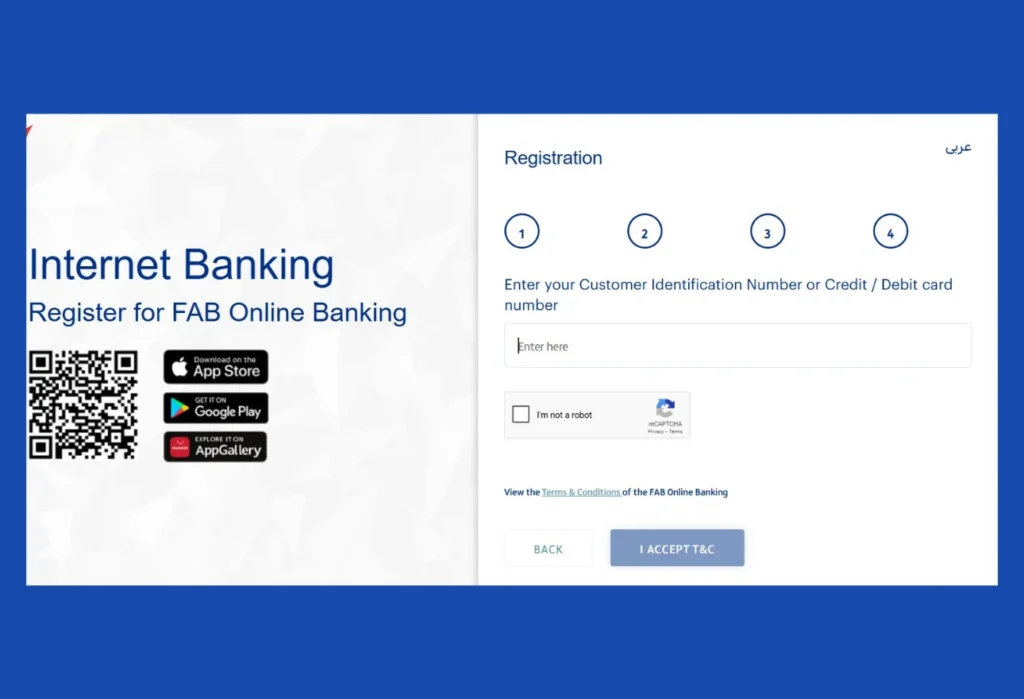
To create an account with FAB, follow the step-by-step process below:
- Open the official bank FAB website.
- Tap or click on the “LOGIN” button present at the top-left corner.
- Again, click on the “REGISTER NOW” button.
- Put your CID (Customer Identification Number) or Credit Card, or Debit card number.
- Put your Emirates ID.
- Provide the 6-digit OTP: FAB will send a 6-digit code to you. 3 digits to your registered mobile number, and the other 3 to your registered email.
- At the final step, you have to set up a new password. Do so and get yourself registered.
How to Log in to FAB Internet Banking?
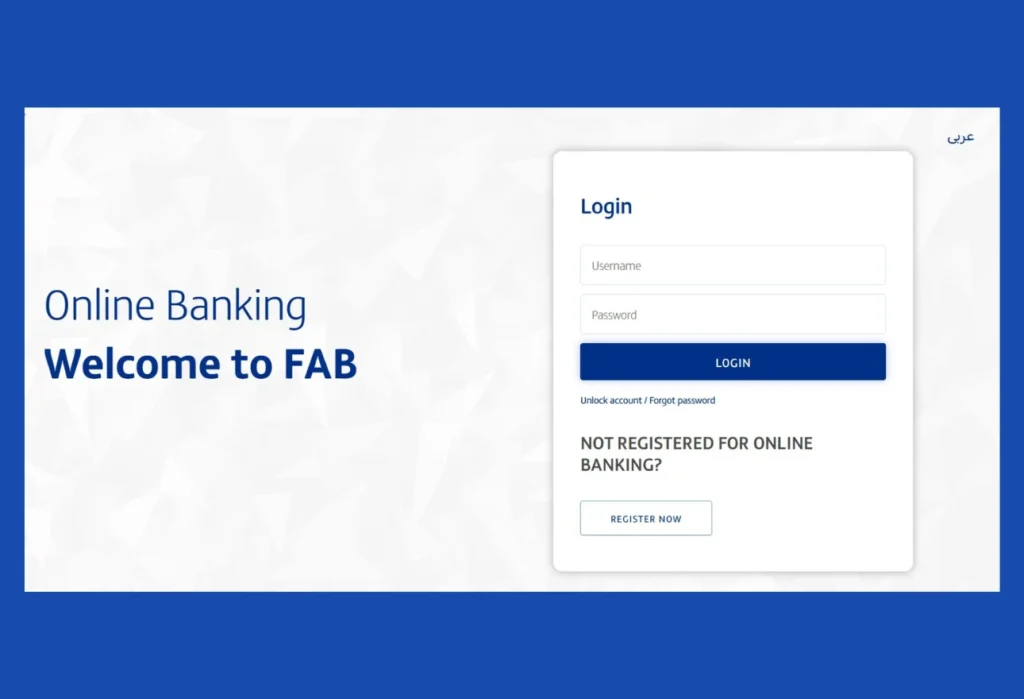
Following is the step-by-step process to log in to the internet banking:
- Browse the official bank FAB website in your browser.
- Tap on the “LOGIN” button with a lock icon located at the top-right corner.
- In the 1st box, write down your username.
- In the 2nd box, write down your password.
- Now, click on the “Login” button, and you will be redirected to your account’s home screen.
You can also checkout this video tutorial to log in to the FAB Online Banking:
How to Register for and Use FAB Mobile Banking?
To use the FAB mobile banking app, first, you have to either register or log in to the FAB app.
Steps to register:
- Install the First Abu Dhabi Bank mobile app.
- iPhone: FAB Mobile
- Android: FAB Mobile Banking
- Huawei App Gallery: FAB Mobile App
- Click on the “Already a customer” option available below the“Join FAB” button.
- In the box, provide your CID (Customer Identification Number)/ Credit Card / Debit card number.
- Follow the upcoming on-screen prompts to get registered with the FAB app.
We also have a video tutorail:
Types of FAB Online Banking Accounts
First Abu Dhabi Bank offers a range of banking accounts to its customers that they can easily manage around the world using their online banking services. And every account is catered to address a specific problem, making it the best choice for customers who want dedicated solutions for their specific problems.
Now the question is, what kind of online bank accounts does FAB offer?
The following are the types of online bank accounts offered by FAB:
- Savings accounts
- Current accounts
- Salary-based accounts
- Zero balance accounts
- Business accounts
- Shariah Compliant accounts
Check out this guide on FAB iSave savings Account.
How to transfer Money through FAB Online Banking?
If you want to send money through online banking, then you can follow the step-by-step instructions below:
- Choose the transfer option available on the home screen.
- Choose the beneficiary—you want to send
- Pick the money transfer account.
- Write down the transfer amount.
- Select the purpose of sending.
- Enter your 6-digit PIN code for a successful money transaction.
How to Reset or Change the Password of FAB Online Banking?
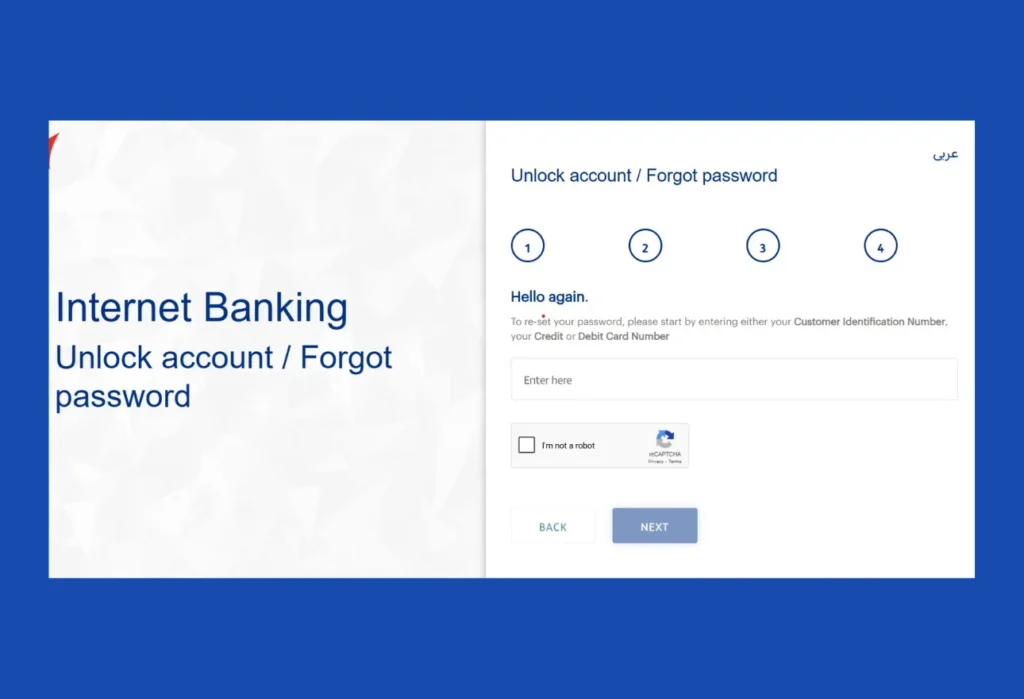
To reset your FAB online banking password, follow the procedure below:
- On the website login page, click on the “ Unlock account / Forgot password”
- Now you have to put your CID (Customer Identification Number) / Credit / Debit card number.
- After that, follow the other 3 steps to change or reset your password.
Important tools and Calculators offered by FAB Digital Banking
Here are the online tools offered by FAB Bank for daily banking issues.
- IBAN Generator
- Branch & ATM Locator
- Debt Burden Ratio Calculator
- Personal Loans Calculator
IBAN Generator
FAB IBAN generator lets you generate your IBAN instantly. Just visit the IBAN generator page, enter your 16-digit account, and then click on “Generate IBAN” to get the number.
Branch & ATM Locator
Not able to find your nearby branches or ATMs? Use the FAB “Branch and ATM Locator” to find your nearest FAB branch or ATM. Just click on the Branch or ATM boxes, and in seconds, your desired option’s result will be visible on your screen.
Debt Burden Ratio Calculator (DBR Calculator)
If you want to calculate your Debt Burden Ratio, then the FAB DBR calculator is the best way to do so. Just visit the DBR page, select the“Debt Burden Ratio” tab, provide the necessary details, and get your DBR ratio.
Personal Loans Calculator
FAB personal loans calculator lets you calculate your loan—how much money you can borrow and what your monthly installment is—in just seconds. Simply visit the page, give them your essential details, and get your loans calculated.
What are the best Security Tips for Safe & Secure FAB Online Banking?
If you want to enjoy a safe and secure FAB banking experience, make sure you follow the below security tips:
- Enable Two-Factor Authentication (2FA).
- Always create a strong PIN or password.
- Make sure you keep your password private—no sharing with anyone.
- Ensure not to use shared devices and public Wi-Fi.
- Always be alert to scams.
- Make sure you only use the official bank FAB portal or mobile app.
- Turn on the OTP verification feature.
- Contact FAB support in case of an unauthorised or unusual activity on your account.
- Log out if you are using somebody else’s mobile phone to prevent unauthorized access and the potential risk of losing money.
What is the process to update my new mobile number in my bank records via FAB Online Banking?
To update your new phone number in bank records, follow the steps below:
- Open the First Abu Dhabi Bank’s website.
- Click on the “Services” option.
- Again, touch on the “Other Services” option.
- Now tap on the “Update Mobile Number” to update your phone number.
How to update my Passport / Visa details in your bank records using FAB Online Banking?
How can I update my Passport / Visa details in my bank records using FAB Online Banking?
- Log in to the First Abu Dhabi Bank’s portal.
- Tap on your Profile name.
- Choose “My document” from the menu.
- Click on ‘Add New Document”.
- Select the “Passport” or “Visa” option.
- Upload your new document to reset the bank records.
FAB Internet Banking Customer Care
| FAB Customer Service | Helpline Within UAE | Helpline outside of the UAE | |
|---|---|---|---|
| For General Queries | 600 52 5500 |
+971 2 681 1511 | [email protected] |
| e-Dirham |
600500201 | +971 2 4996125 | [email protected] |
| Ratibi | 600522298 | +971 2 4996279 |
[email protected] |
| FAB Islamic | 8002200 |
+971 2 4996299 | [email protected] |
| Payit | 600543329 | +971 2 4996411 | [email protected] |
| FAB Commercial Banking | 600 52 2235 | +971 2 499 6700 | [email protected] |
| FAB Elite Banking | 80040000 | +971 2 4103402 | [email protected] |
| FAB Private Banking | 80040000 | +971 2 4996599 | [email protected] |
FAB Online Banking Related FAQs: Frequently Asked Questions
If I forget my FAB Internet Banking password, what process should I follow to reset it?
To reset your FAB internet banking password, open the official bank FAB website → Tap on the “Login” button → click on “Unlock the account / Forget Password” and follow the next instructions to reset the password.
Does FAB allow me to transfer my money to a foreign bank account through FAB internet banking?
Yes, you can transfer your money to an international bank account through FAB digital banking.
If I found any unauthorised or suspicious activity on my FAB internet banking account, what step should I take?
Immediately contact the FAB customer care (600 52 5500) if you see any suspicious activity on your FAB account.
If I use FAB internet banking, will it be safe and secure to use?
Yes. It is completely safe and secure.
What is the process I should act on to check my account statement using FAB internet banking?
Log in to the website → Go to the menu section → Look for “Download statements” or “Get stamped statement” options → click any of them and select a statement frequency→ Now click on the download button to get it into your device storage.
Is FAB a good bank?
Yes, FAB is considered one of the best banks in the UAE, offering digital solutions to traditional banking problems.
What is the ranking of the FAB Bank in the world?
It ranks at the 1st in the UAE and 4th in the Arab Countries, but globally it holds the 303rd position according to Forbes’ annual ranking, where they ranked the 2000 largest public organisations working around the globe.
Is FAB an international bank?
Yes, FAB offers its services both locally and internationally.
What was FAB bank before?
Before FAB, we had two banks—FGB (First Gulf Bank) and NBAD (National Bank of Abu Dhabi). In 2017, they merged and gave birth to the First Abu Dhabi Bank (FAB).
What is the process I should follow to check the FAB balance through Online Banking?
Open the official site → log in using your username and password → On the dashboard, you can see your balance under the “available balance” section.
Can I manage my FAB Islamic accounts through FAB Online Banking?
Yes, you can easily manage your Islamic accounts using the online banking channels such as the FAB mobile app and official portal.
What are the key features offered by FAB’s Online Banking service?
FAB digital banking offers key features such as account management, bill payment, both international and local fund transfers, download statements, and much more!
How can I generate IBANs through FAB Digital Banking?
You can use the FAB “IBAN Generator” tool to do so.
Are First Abu Dhabi Bank’s Online Banking Services Free?
Not all, but some of the FAB digital banking services are free, such as ATM & branch locator, balance inquiry using the FAB app or official portal, and account creation etc.
Can I make a transfer through First Abu Dhabi Bank’s Online Banking?
Yes, you can make both transfers—one-time or recurring—using online banking.
How much can I transfer using Online Banking?
The maximum amount that you can transfer through online banking is AED 100,000 a day.
How can I download my Credit Card e-statement through Online Banking?
Open the official website → Login → Go to “Credit Cards” option → Choose the card → Tap on the “Download statement” option to download your credit card statement.
How to Unlock the Account of First Abu Dhabi Bank’s Digital Banking?
Go to the login page on the official website, click on the “Unlock account”, and then follow the next procedure to unlock your account.