
Want to find your nearby FAB ATMs? And that too, in Sharjah, Dubai, Ajman, and other cities in the United Arab Emirates? Then, this comprehensive and up-to-date guide on locating your nearby First Abu Dhabi Bank ATM is the best resource for you.
Furthermore, FAB ATMs offer a wide range of services, such as withdrawing or depositing money, checking the card balance, changing the PIN, paying bills, and more.
So, go through this guide, get to your closest ATM, and use your required FAB ATM service.
Why should we use FAB ATMs?
Why should you use a FAB ATM? Because it offers you numerous banking perks that others may not have.
Additionally, FAB has an extensive network of ATMs across the UAE, making them accessible to all customers within the UAE.
Most importantly, the following are the main benefits or features that make First Abu Dhabi Bank ATMs the best option to choose from:
- You can inquire about your FAB card balance.
- You can request Cheque books.
- You can change or reset your PIN.
- You are allowed to make your credit card bill payment.
- You are allowed to send your funds to other accounts.
- You will be charged no fee for a balance inquiry at FAB ATMs—Non-FAB may charge.
- You can see your transaction history or print statements.
- You can withdraw your cash.
- You can print your receipt.
- You can select your preferred language.
All those perks and 24/7 customer support make First Abu Dhabi Bank ATMs the all-in-one solution and hence, the first choice of FAB customers.
How to Find a First Abu Dhabi Bank ATM Near You?
The following are the ways you can locate your nearby FAB ATM:
Using the FAB Mobile Application
- Open the FAB Mobile App.
- Log in to it by mentioning your login credentials.
- Head over to the “ATM and Branch Locator” feature within the app.
- Play with the on-screen filters and find your closest FAB ATM.
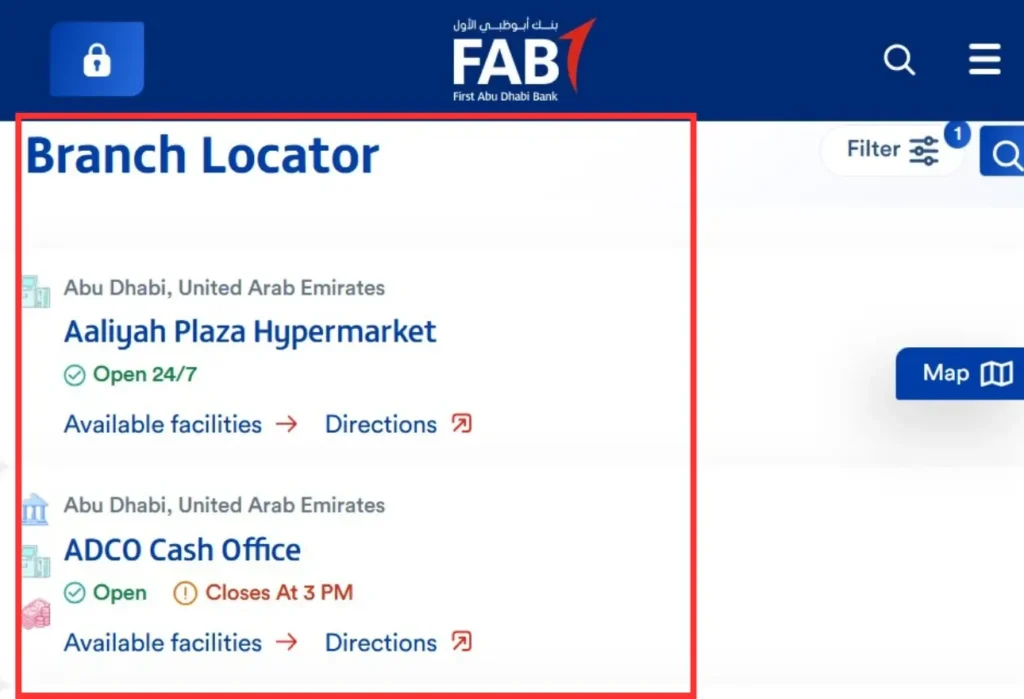
Using the BankFAB Official Website
- Open the browser and type “FAB ATM and Branch Locator Tool.”
- Open the first link of the official FAB website.
- Click on the “Filters” option.
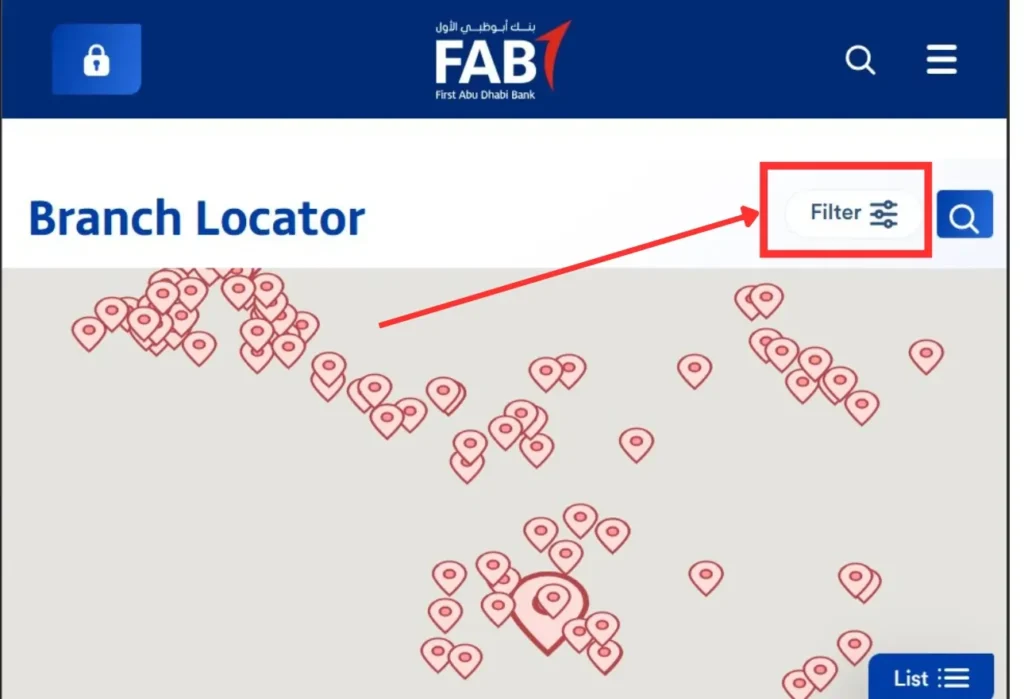
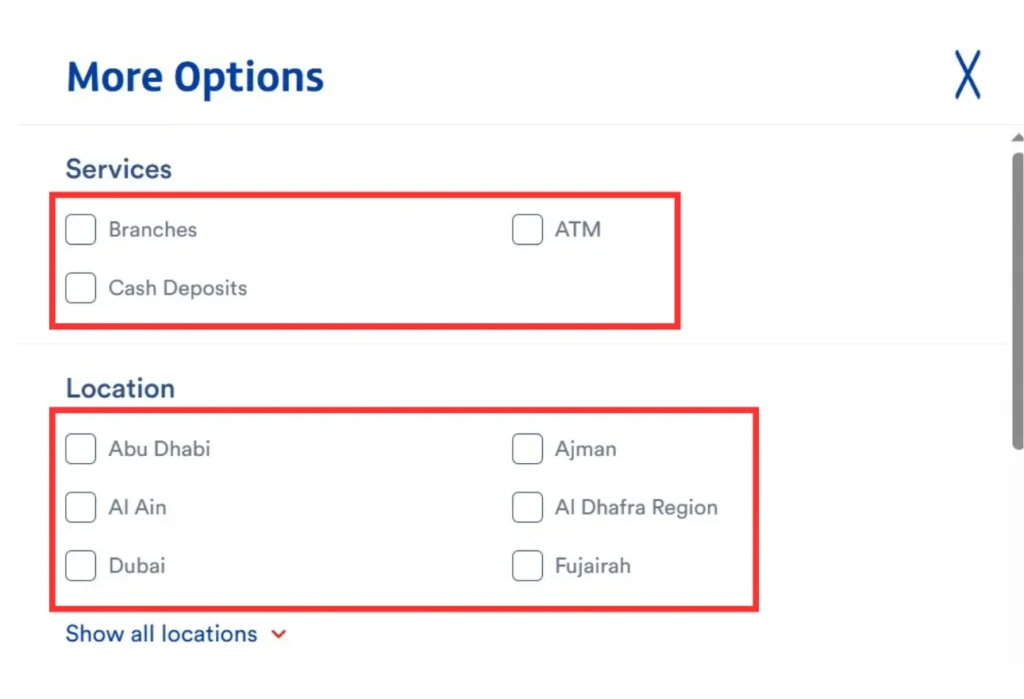
- Now, here, check the “ATM” box.
-
Select your City.
- You can choose from Abu Dhabi, Dubai, Ajman, Ras Al Khaimah, Umm Al Quwain, Fujairah, Al Ain, and Al Dhafra Region.
- Select the Timings—24/7, Open Now, or Temporarily closed.
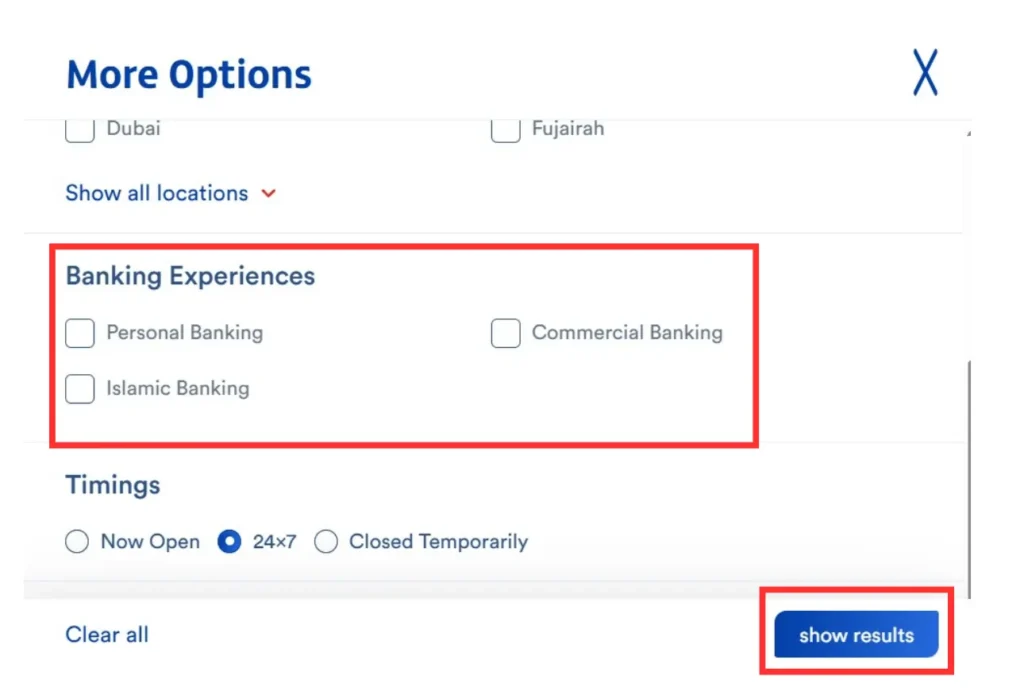
- Tap “Show Results” to find your closest FAB ATM location.
Using the Google Maps App
- Navigate to the Google Maps app.
- Write this text, “FAB ATM Near Me”, in the search box.
- And your nearby FAB ATM Locations will be visible on your screen.
- Tap on your preferred ATM location, and the app will provide you with further directions.
Using FAB Customer Care Service
-
Dial the First Abu Dhabi Bank customer support
helpline
- Inside the United Arab Emirates: 600 52 5500
- Outside of the United Arab Emirates: +971 2 6811511
- Request the FAB Customer Service agent (or virtual agent) for the nearest FAB ATM location.
Using GPS Navigation Smartphone Apps
-
Install the GPS navigation app and open it.
- Apps such as Waze, HERE WeGo, Apple Maps, and Petal Maps (for Huawei devices), etc.
- Tap on the search box and search for “FAB ATM”.
- View your nearby First Abu Dhabi Bank ATM.
- Click any of them, and the app will further guide you about the easiest routes and directions.
First Abu Dhabi Bank ATM Locations in UAE
First Abu Dhabi Bank ATM Locations in Sharjah
| Location (city) | FAB Branch Name | Branch Address | Number of ATMs |
|---|---|---|---|
| Sharjah | Sharjah Corniche Centre |
Buhaira Centre, G-Floor, Al Reem Plaza |
1 |
| Sharjah | Al Dhaid Branch | 7VPJ+25W – Al Dhaid – Sharjah | 2 |
| Sharjah |
Al Madam Branch |
WQ7G+R8 Sharjah – Al Madam | 2 |
| Sharjah |
Al Zahia City Centre Digital Branch (No
teller services) |
City Centre – Muwaileh Commercial – Al Zahia – Sharjah | 1 |
| Sharjah | Khorfakkan Branch | Alhawame Suburb – Sharjah | 2 |
First Abu Dhabi Bank ATM Locations in Abu Dhabi
| Location (city) | FAB Branch Name | Branch Address | Number of ATMs |
|---|---|---|---|
| Abu Dhabi | Mushrif Mall Branch | Mushrif Mall – Abu Dhabi |
4 |
| Abu Dhabi | FAB Commercial FAB One Tower | Sheikh Khalifa Street – Al Danah – Zone 1 – Abu Dhabi | 1 |
| Abu Dhabi | FAB Islamic Business Park branch | Khalifa Business Park – Al Qurm – Zone 1 – Abu Dhabi | 3 |
| Abu Dhabi | Abu Dhabi Mall Branch |
F9WM+844 – Al Zahiyah – E16 01
– Abu Dhabi |
2 |
| Abu Dhabi | Al Khubairah | Al Khubeirah Zayed First Street – Khalidiya St – Abu Dhabi | 3 |
First Abu Dhabi Bank ATM Locations in Dubai
| Location (city) | FAB Branch Name | Branch Address | Number of ATMs |
|---|---|---|---|
| Dubai | Dubai HealthCare City Branch |
Opp Wafi Centre, Building 47, Dubai Healthcare
City |
2 |
| Dubai | Dubai Hills Mall – Digital branch (no teller services) | 462R+P4W – Dubai | 1 |
| Dubai |
Jumeirah Plaza Branch (Digital branch with no
teller services) |
Ground Floor in Jumeirah Plaza – Jumeirah Area 1 | 2 |
| Dubai | Rolex Tower Branch | 117 Sheikh Zayed Road – Trade Centre – DIFC | 2 |
| Dubai | Abu Baker Al Siddique Branch | Abu Baker Al Siddique St – Deira – Dubai | 5 |
First Abu Dhabi Bank ATM Locations in Ajman
| Location (city) | FAB Branch Name | Branch Address | Number of ATMs |
|---|---|---|---|
| Ajman | Ajman Branch |
Al Ittihad St – Al Jurf 2 – Ajman |
4 |
| Ajman | Istanbul Supermarket (non-FAB) | Istanbul Supermarket | 1 |
| Ajman | ADNOC – Al Reqayeb (non-FAB) |
ADNOC – Al Reqayeb | 1 |
| Ajman | ENOC (non-FAB) | ENOC (Emirates National Oil Company) | 1 |
| Ajman | Lulu (non-FAB) | Lulu Hypermarket | 1 |
Services Provided by FAB ATMs
The following are the services provided by First Abu Dhabi Bank ATMs:
- PIN Changing or Resetting: Reset your card PIN in seconds.
- Bill Payments: Make your utility, electricity, gas, and phone bill payments.
- Credit Card Bill Payment: Pay your credit card bills instantly.
- Transfer your Funds: Send your money from and to a FAB account.
- Print Receipt: Print your receipt using FAB ATMs.
- Get Mini Statements: You can also get your mini statements using ATMs.
- Balance Inquiry: Get your remaining balance info on your ATM screen.
- Cash Deposit: Deposit your cash at any FAB ATM instantly.
- Cash Withdrawal: You can withdraw cash from FAB ATMs in any major currency, such as AED and USD.
FAB ATMs: Fees or Charges
FAB ATMs Withdrawal Fees
| ATM | Withdrawal Fee (AED) |
|---|---|
| FAB ATM Withdrawal (United Arab Emirates) | Free |
| Non-FAB ATM Withdrawal (United Arab Emirates) | AED 2.10 |
| GCCNET ATMs (Gulf Cooperation Council countries) | AED 6.30 |
| International ATM Withdrawal | AED 21 approx |
FAB ATMs Fees of Debit Card Services
| Debit Card Services | ATM Fee (AED) |
|---|---|
| Per transaction charges at FAB ATMs | Free |
| Per transaction charges at Non-FAB ATMs in the UAE | AED 2.10 |
| Per transaction charges at Non-FAB ATMs in the GCC | AED 6.30 |
| Per transaction charges at Non-FAB International ATMs | AED 21 |
| Balance Inquiry at FAB ATMs | Free |
| Balance Inquiry at Non-FAB ATMs in the UAE | AED 1.05 |
| Balance Inquiry at Non-FAB ATMs in the GCC | AED 3.15 |
| Replacing Secret PIN | Free |
| Utility Bills Payment | Free |
Important information related to FAB ATMs
- FAB may charge for international currency conversion when you’re going abroad, i.e, travelling.
- Want to increase your limits? Contact FAB customer care or visit your nearest First Abu Dhabi Bank branch.
Some tips for using FAB ATMs
- Always reach out to FAB ATMs for a free balance inquiry.
- Ensure you hide your PIN while typing at the ATM.
- Don’t forget to retrieve your card after you’re done with your ATM usage.
- If the ATM swallows your card, please immediately visit the nearest First Abu Dhabi Bank branch or contact a FAB customer service agent.
- Ensure you visit the ATM during opening or working hours.
How Secure are FAB ATMs?
FAB has implemented modern security features in its ATMs, making them highly secure against potential threats. These security features include end-to-end encryption, secure transactions, Anti-skimming technology, surveillance cameras, and more.
FAB ATMs FAQs: Frequently Asked Questions
Are FAB ATMs available 24/7?
Not all, but some FAB ATMs are available 24/7.
Am I allowed to deposit my cash in the FAB ATM?
Yes, you can deposit your cash in the ATM.
Does FAB allow me to use the ATM even without a card?
Yes, you can use a FAB ATM without a card because they do provide cardless cash withdrawal.
If there is an issue with the ATM, what can I do?
If the ATM is not working, please head to the FAB branch connected to the ATM or approach another FAB ATM.
How much does FAB ATM charge?
Using the FAB ATM is free for FAB Customers. However, if you use a non-FAB ATM, you may be charged a fee.
Can I withdraw internationally using my FAB debit card?
Yes, but standard charges plus FX markup may apply.
What is the FAB ATM withdrawal limit per day?
It depends on the FAB card you are using. For example, per-day withdrawal limits for Standard Debit and Platinum Debit Card are AED 15,000 and AED 20,000, respectively.
Are ATM withdrawals free at FAB?
Yes, it’s free at only FAB ATMs.