FAB Bank Salary Account Balance Check: Instant Online & Offline Methods
Are you stuck checking your FAB Bank salary account balance? Don’t know what the fastest, effortless, and straightforward ways are for the balance inquiry?
If that’s what you’re looking for, then don’t worry. We have everything you need for your salary account balance checking. And I bet you this is gonna be the only guide you’ll ever need. Yes, I mean it!
The methods we’re going to cover in this tutorial are:
With that said, it’s time to dive into checking your FAB salary account balance. Ready? Let’s go!
6 Best and Effortless Ways to Check Your FAB Salary Account Balance
Method 1: FAB Bank Salary Account Balance Check using the Mobile App
FAB Mobile Banking is a simple and instant way to view your FAB bank salary account balance. Simply, you just have to log in/register to get your balance status.
And guess what? Using this method, you are given real-time information about your salary account.
Steps:
-
Install the App: Install or
download the FAB Mobile app.
- On Android: Google Play Store.
- On iPhone: App Store.
- On Huawei devices: Huawei AppGallery
- Login (already registered): Click the “Login” button and enter your details (username/email and password) to log in.
-
Register (new user of the FAB
App):
- Click on the menu icon.
- Tap on “Register for Mobile Account”.
- Follow the next on-screen instructions to complete the registration.
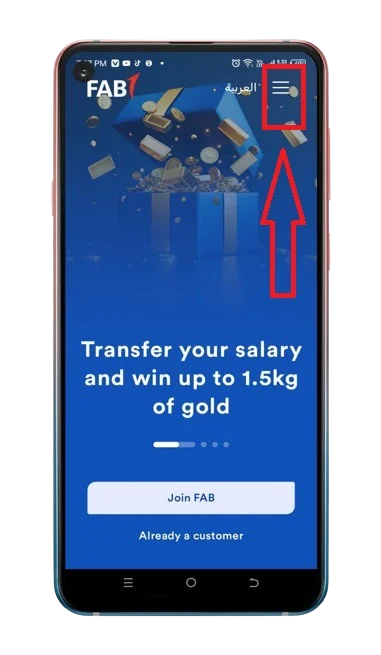
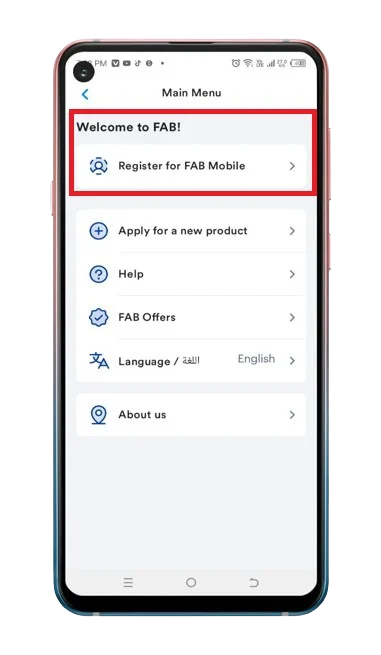
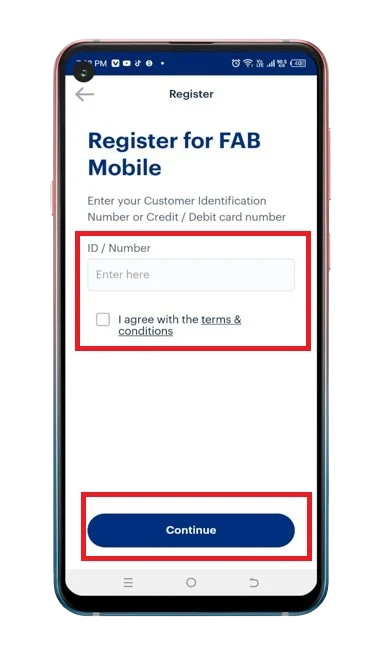
- View your Balance: On the app home screen, under the “Available Balance” section, you can view your bank FAB salary account balance.
Keep in Mind: During the login process, you may need to enter an OTP (One-Time Password) if you have enabled Two-Factor Authentication. It will be delivered to either your registered mobile number or email.
Method 2: FAB Bank Salary Account Balance Check using Online Banking
If you prefer to check your bank FAB Pay Account Balance Online, then this method of internet banking is an easy and convenient solution to do so.
Steps:
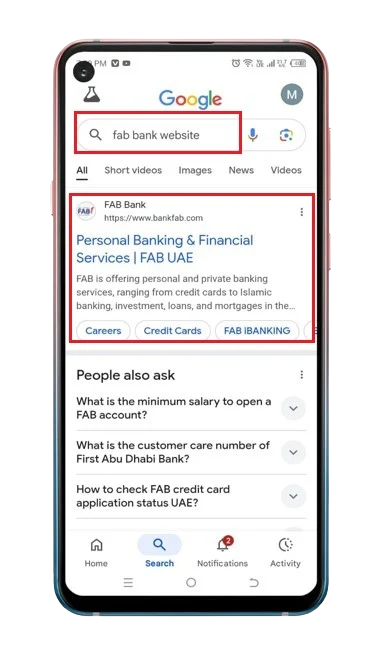
- Visit Website: Access the FAB bank main site.
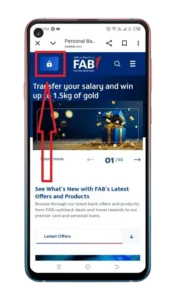
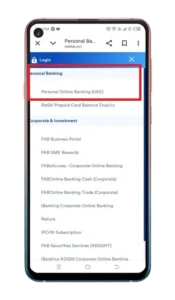
- Personal Banking Tab: Tap on “Personal Online Banking (UAE)” under the “Personal Banking” section.
- Log in: Tap on the “LOGIN” button after mentioning your login information.
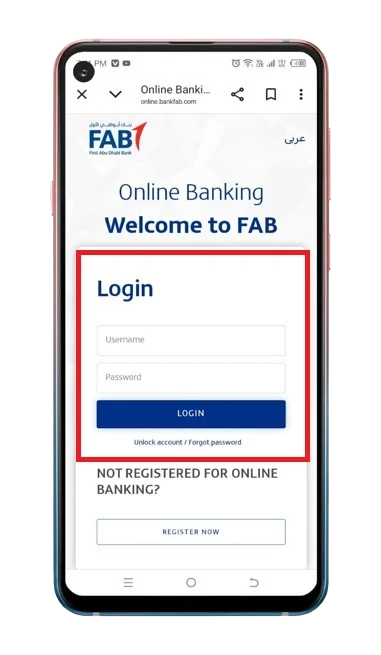
- Register: if you’re using the FAB website for the very first time.
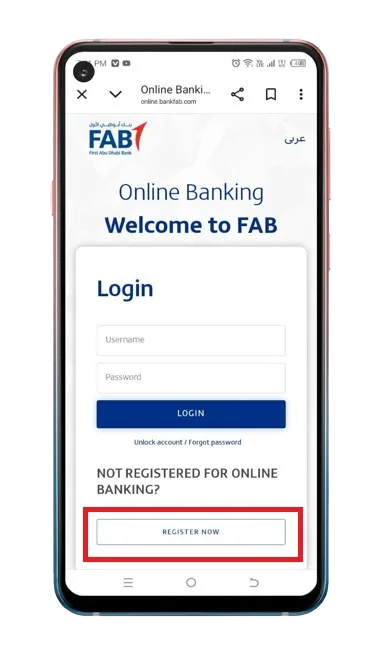
- View Your Balance: You can view your FAB employee account balance on the screen.
Method 3: FAB Salary Check using SMS Banking
For those without an internet connection or in a low-speed internet area, checking their FAB Payroll account balance using SMS Banking is a convenient option.
Steps:
- Register for SMS Service: You can only use the FAB SMS Banking if you have a registered mobile number (Only du or Etisalat). If you are not, call the FAB customer care helpline (600625500) or go to a nearby branch to register.
- Message: Write the message —> “BAL”.
- Send: Send this text message of “BAL” to 2121.
- Get your Balance status: Open the response message and review your FAB bank salary amount.
Method 4: FAB Bank Salary Account Balance Check using an ATM
If you want to inquire about your FAB salary account balance offline, the best way to do so is to visit a nearby ATM.
Steps:
- Locate the ATM: Go to the FAB ATM.
- Select the language: You will have two options—English and Arabic.
- Insert the card: Look for the insertion slot and simply place your debit card into it.
- Balance Inquiry: Locate the “Balance Inquiry” tab and tap it.
- View your account balance: You can see your FAB salary account balance available on your ATM screen.
Pro Tip: You can locate the closest ATM using the “FAB ATM Finder tool”.
Method 5: FAB Bank Salary Account Balance Check using Call Support (Telephone Banking)

Steps:
- Call: Make a phone call to the FAB Phone Banking number 600625500 (UAE) or +971 2 6811511 (international).
- Request for Balance Inquiry: Speak with the FAB Virtual Agent (AI agent) and request a balance inquiry.
- Get Account Balance Details: The FAB Virtual agent will tell you your FAB salary account balance during the call.
Pro Tips:
- You can say “Repeat” to this AI agent to repeat the information at the end of the query.
- If you want to speak with a FAB customer service agent, then this decision will be made by the AI assistant, which will automatically decide whether it can solve your problem or should connect you with a human agent, based on the query you requested. So, the decision to talk to a customer service agent depends on this AI agent.
Method 6: FAB Bank Salary Account Balance Check by Visiting a FAB Branch

Steps:
- Collect the essential documents for authentication and keep them with you at all times.
- Locate the nearby FAB Branch.
- Request the bank teller for a balance inquiry.
- The relevant bank person will tell you about your salary account funds shortly.
Pro Tip: Aren’t aware of nearby FAB branch? You can easily find your nearby branch using the “FAB ATM and Branch Finder” tool.
FAB Bank Salary Account Balance Check for International Customers
If you live outside the UAE, the process for checking your FAB payroll account balance remains the same. Only SMS banking will not work in your case because it requires a UAE-registered mobile number (only Etisalat or Du).
As a foreigner, these are some of the easiest ways you can use to inquire about your balance.
Want more methods for your balance check? Read this complete guide on all FAB Balance Inquiry methods.
What are FAB Bank Salary Accounts?
The salary accounts are payroll-based and provided by the bank for working professionals or employees. In brief, they offer modern solutions to traditional salary management.
The perks offered by these FAB accounts are
What are the Types of FAB Salary Accounts?
The following are the types of salary accounts provided by First Abu Dhabi Bank (FAB):
Perks offered by FAB Bank Salary Accounts
FAB One Account
Personal Current Account
Elite Current Account
FAB Etihad Guest Account
FAB Etihad Elite Guest Account
Procedure to open a new Salary Account
Steps:
- Confirm you fulfill the eligibility conditions.
- You should possess all the compulsory documents.
- In the final step, you must complete the relevant salary account application form and submit it.
What are the Eligibility Criteria for the FAB Salary Account in the UAE?
Personal Current Account
FAB One Account and FAB Etihad Guest Account
Elite Current Account
It has 3 requirements:
FAB Etihad Elite Guest Account
Documents needed for the FAB Salary Account Opening
The documents that are necessary to activate the salary account in the UAE are listed below:
Note: Sometimes, FAB may require additional documents for verification.
How to Open the FAB Salary Account Online in the UAE?
Open your FAB salary account by acting upon the following step-by-step process:
- Visit the bank FAB’s relevant salary account webpage.
- Now, touch on the “Open your account” or “Apply Now” option.
- Complete the form with the information it requires and then submit it.
Keep in Mind: You can also submit your application at the nearby FAB Branch. Ensure that you bring the compulsory documents along when you’re attending an in-person application.
If you prefer a visual tutorial for the salary account online opening, checkout this step-by-step video:
How to Open the FAB Salary Account Offline in the UAE?
If you want to open your salary account offline, below is the process to do so:
- Carry the required documents.
- Go to your nearby FAB bank branch.
- Request for account opening.
- Fill out the application form.
- Get your account opened.
FAB Salary Account Vs. Ratibi Prepaid Salary Card
| Features | FAB Salary Account | Ratibi Prepaid Salary Card |
|---|---|---|
| What is it? | Fully featured banking solution | Payroll solution |
| Bank Account Needed | Yes | No |
| Cheque Book | Yes | No |
| Mobile and Online Banking | Full access | Limited access |
| Minimum Balance Requirement | Yes(varies from account to account) | No |
| 24/7 Customer Support | Yes | Yes |
| ATM Service | Yes | Yes |
| Best For | Professionals, Office staff, Skilled workers | Blue-collar employees, labourers |
Check
We also have a dedicated guide on FAB Prepaid card balance inquiry: Check out this article on Prepaid Card Balance check.
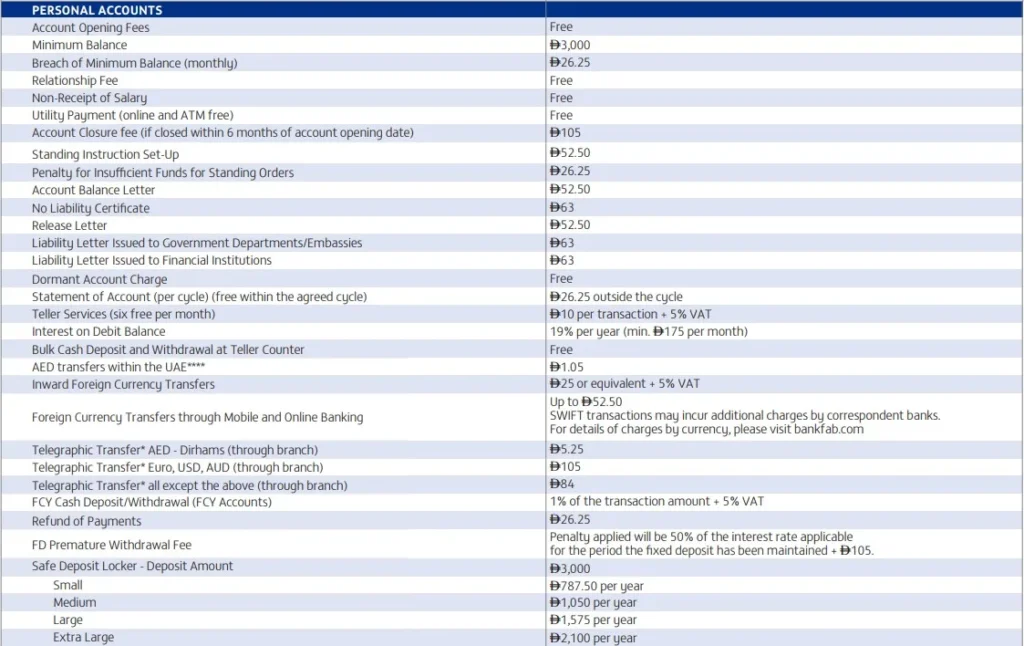
FAB Bank Salary Accounts Fee or Charges