
What is the FAB iSave Account?
The FAB iSave account is a unique zero-balance account, which means it does not require a minimum balance to be maintained. It is one of the best digital savings accounts in the UAE, offering a 4.50% interest rate on newly deposited funds and does not require a chequebook or debit card.
Furthermore, it provides a lot of benefits to savers, such as high interest rates, zero minimum balance requirement, competitive savings rates, round-the-clock money withdrawals, and advanced security features (OTP and biometric verification).
And the best part? You can manage your iSave account without stepping into a FAB branch. Simply log in to FAB Online Banking or download the FAB Mobile Banking app for a seamless and convenient banking experience.
Most importantly, you can open your iSave account with ease, whether you’re a new First Abu Dhabi Bank customer or already have an account. The choice is yours-open it online, via the mobile app, or in branch.
FAB iSave Account Features and Benefits
The following are the advantages offered by the FAB iSave account:
- Zero minimum balance requirement.
- Unlimited cash withdrawals.
- 4.50% per annum interest rate on new funds that are deposited within the time frame of 01 May 2023 to 30 June 2025.
- AED currency support.
- FAB Mobile app or Online Banking for real-time account opening.
- 24/7 customer support.
- Highly secured banking.
- Zero maintenance charges.
Zero Minimum Balance Requirement
The FAB iSave account doesn’t require any minimum amount in your account. Although some savings accounts have minimum balance requirements, with iSave, you can start saving with as little as $1.
Unlimited Cash Withdrawals
It lets you withdraw your cash anytime and anywhere without any limit. This way, it becomes a valuable option for those who need frequent withdrawals.
4.50% Interest Rate (Promotional Rate)
This iSave account offers savers a competitive interest rate of 4.50% per year. The only condition for this rate is that you must deposit your new funds within the period from 1 May 2023 to 30 June 2025.
AED Currency Support
If you are a UAE resident and need to perform local transactions such as depositing and withdrawing money in the local currency, the FAB iSave account has got you covered, as it’s also available in AED (Arab Emirates Dirham).
FAB Mobile app or Online Banking
These digital portals allow you to manage your FAB iSave account easily and quickly, anytime and anywhere.
They allow you to:
- Update your iSave account details.
- Perform a balance inquiry.
- Block or unblock the account.
- Make bill payments.
- Send money.
- Earn rewards.
And more.
Customer Care
It offers savers 24/7 customer support, helping you at any time and anywhere in case of any query.
You can contact the FAB customer care through these numbers:
- 600 52 5500: for UAE residents
- +971 2 681 1511: for international customers
Highly Secure Banking
With FAB, you don’t need to worry about your security, as they have implemented strong security measures to provide a safe and secure banking environment that protects both your account and personal details.
Zero Maintenance Charges
The FAB iSave is a zero-maintenance fee account, meaning it does not charge you a single penny in maintenance fees.
FAB iSave Account Interest Rates Structure (base interest Rates)
The following are tiered interest rates that only apply when you’re not depositing new funds:
| Band (Balance Range) | Interest Rate (per year) |
|---|---|
| Lower than AED 500,000 | Up to 2.465% |
| AED 500,000 up to AED 5,000,000 | 2.465% — 3.251% |
| AED 5,000,000 and greater | 3.251% or below |
Note: These rates are subject to change. Make sure to check out the FAB official iSave account page for the latest rates.
FAB iSave Account Eligibility Criteria for Account Opening
Its eligibility criteria are as follows:
- An Existing Bank FAB Account: Applicants must first have an account with FAB to apply for an iSave account. That account is for FAB online or Mobile banking registration.
- Emirates ID: Applicants must bring a valid Emirates ID.
- Proof of Income: A salary certificate or bank statement is known as proof of income.
- Nationality: Only UAE citizens who possess a valid Emirates ID are eligible to apply.
- Age: The applicant’s age must be at least 18 years.
- Customer Type: This program is only available to individual customers. Others (join or corporate customers) can not.
- Job Status: Whether you are salaried, non-salaried, or self-employed, you are eligible for it.
FAB iSave Account Requirements
FAB iSave Account Required Documents
If you are planning to apply for the FAB iSave account, make sure you have the following must-have documents:
- Emirates ID: A copy of it.
- Proof of Income: The Bank may ask for an income statement or a salary slip as proof of income.
- Passport Photocopy.
- A copy of your Resident Visa.
How to Open a FAB iSave Account? Step-by-Step Guide
Method 1: FAB iSave Account Opening Online Banking
- Open the FAB bank website:
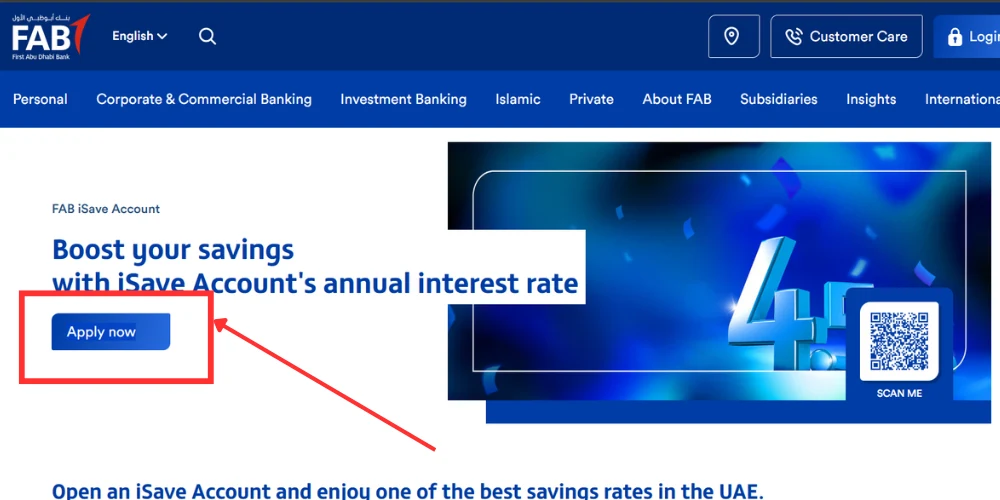
- Visit the FAB iSave account page —> FAB iSave account page
- Press the “Apply now” button.
- Complete your iSave Application form.
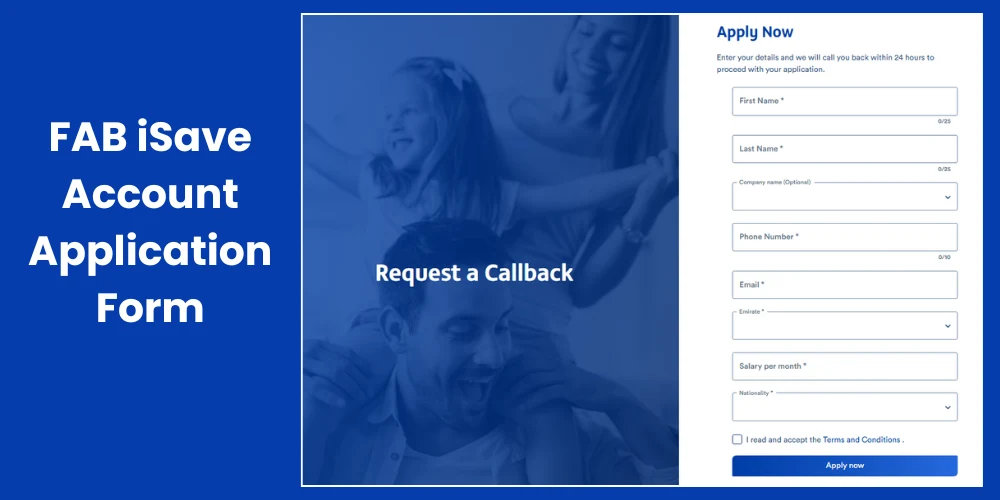
5. Review and then submit the form.
If you prefer visual iSave account creation, check out this step-by-step video tutorial:
Method 2: How to Open a FAB iSave Account through the FAB Mobile App?
- Open the FAB mobile app after downloading it from your app store.
- Log in to the App using your login credentials (username/email, password).
- Access the menu button, which is usually placed there at the upper-right corner.
- Now choose the “Apply for a new product” option present below the “Products Manager.
- Look for the FAB iSave account.
- Click on it and fill out the form.
- After filling it out, submit it.
You can also watch this video method of creating an iSave account using FAB Mobile App:
Method 3: FAB iSave Account Opening Offline
The following is the process to open your iSave account offline:
- Keep all the required documents with you.
- Go to a FAB branch.
- Request the teller for account opening.
- Complete the application form and submit it.
FAB iSave Account Terms and Conditions
The following PDF includes general terms and conditions for FAB accounts:
Download it from here: Terms and Conditions
FAB iSave Calculator
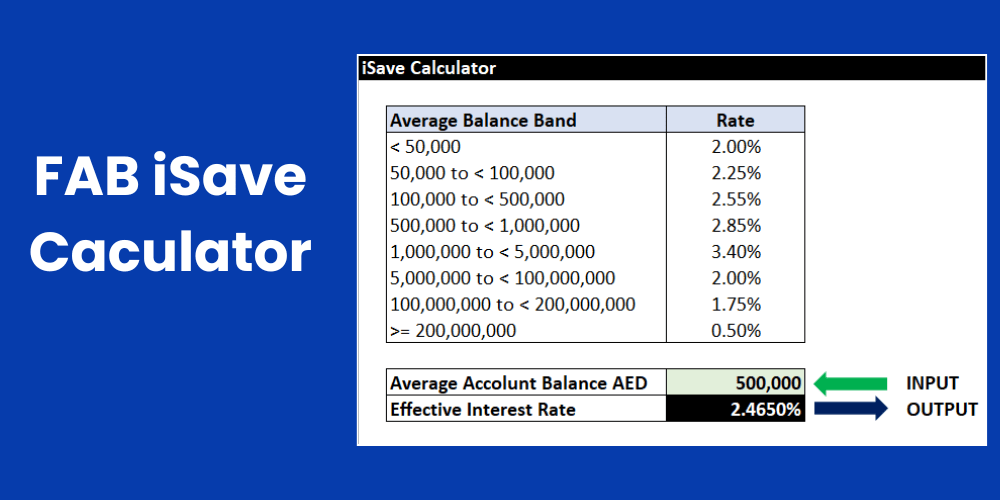
Using the FAB iSave calculator, you can easily estimate the interest earned based on the average balance maintained in your iSave account.
Download it from here: FAB iSave Calculator XL Sheet.
FAB iSave vs. Other FAB Savings Account Comparison
| Benefits | iSave Account | Personal Savings Account | Elite Savings Account | Personal Call Account |
|---|---|---|---|---|
| Minimum Balance | Zero | AED 3,000 or equivalent | Zero | AED 3,000 |
| Minimum Salary Criteria (per month) | Zero | Not Available | AED 50,000 | N/A |
| Multi-Currency Support | No (only AED) | Yes (AED, USD, GBP, AUD, CAD, EUR) | Yes (AED, USD, GBP, AUD, CAD, EUR) | Yes (AED, USD, GBP, AUD, CAD, EUR) |
| Complimentary Debit Card | Not Available | Yes | Yes | No |
| Are UAE Residents Eligible for it? | Yes | Yes | Yes | Yes |
| Are International Customers Eligible for it? | No | Yes | Yes | Yes |
| Maximum Daily ATM Withdrawal Amount | No (because a debit card is not available) | AED 15,000 | AED 40,000 (on FAB World Debit Card & World Elite Debit Card) | No (because a debit card is not available) |
| Account opening (Mobile App) | Yes | Yes | Yes | No |
| Earning FAB Rewards via debit card | No | No | Yes | No |
| Account Closure Fee (if you close within the first 6 months of the account opening) | AED 105 | AED 105 | AED 105 | AED 105 |
Types of First Abu Dhabi Bank Accounts
The FAB bank offers two types of accounts:
- Savings Accounts
- Current Accounts
Savings Accounts
Savings accounts are specially designed for everyday savings purposes, and they are further categorised as follows:
- iSave Account
- Elite Savings Account
- Personal Call Account
- Personal Savings Account
- Deposits (Fixed & Smart accounts).
Current Accounts
FAB’s current accounts are used for day-to-day banking activities, including depositing and withdrawing cash, making bill payments, and transferring funds.
Its types are as follows:
- Personal Current Account
- FAB One Account
- Elite Current Account
- FAB Etihad Guest Account
- FAB Etihad Guest Elite Account
Best Savings Accounts in the United Arab Emirates (UAE)
Conclusion:
This was all about the FAB iSave account. Simply fulfil the eligibility criteria and document requirements, and then apply for the iSave account at the end of the process.
In summary, this is how this iSave account looks:
| Currency Support | Only AED |
| Account Opening Fee | Zero |
| Minimum Balance | Zero |
| Interest Rate | Up to 4.50% |
| Account Closing Fee | AED 105 (if closing happens during the 6 months of opening) |
| Customer Care Service | 24/7 access |
| Maintenance Charges | Zero |
| Access to the FAB Mobile App | Yes |
| Access to FAB Online Banking | Yes |
| No. of Withdrawals | Unlimited |
| SWIFT / International Transfers via Online Banking | Up to AED 52.50 fee. |
FAB iSave Account FAQs: Frequently Asked Questions
Who qualifies to open an account with FAB?
If you’re a UAE citizen and meet the eligibility criteria and document requirements of the FB account, then you can open an account with FAB.
What’s the closure fee of the iSave Account?
Its closure fee is AED 105 if the closing happens within the first 6 months of account opening.
Is the FAB account at zero balance?
Not all, but some FAB accounts are zero balance accounts. One of them is the iSave account.
How do I reach out to FAB if I have queries regarding account opening?
You can contact FAB customer care through these numbers:
- Within UAE: 600 52 5500
- International Contact: +971 2 6811511
Does FAB offer an iSave account in USD currency?
No, the FAB iSave account doesn’t support USD currency.
Does FAB offer a joint iSave account?
No, this account doesn’t support joint account creation. Only individuals can apply for this.
Can we apply for the iSave account with the help of the FAB Mobile App?
Yes. You can.
Can non-residents or visitors open FAB savings accounts?
Yes, non-residents can also open FAB savings accounts other than iSave.
What is the best FAB savings account for high interest?
The best savings account is the iSave, offering an interest rate of 4.50%.
What kinds of accounts does FAB allow to open using the FAB Mobile App?
The following are the accounts you can open via the FAB Mobile App:
- FAB One Account
- Elite Current Account
- Etihad Guest Elite Account
- Etihad Guest Account
- Elite Savings Account
- Personal Current Account
- Personal Savings Account
- Islamic Current Account
What is the process of reporting any fraudulent or suspicious activity on my account?
If you spot any such unusual activity, please reach out to FAB customer care immediately at 600 52 5500.
Which documents are needed for my Identity verification?
You can use your Emirates ID as a document for identity verification.
What is the easiest and best way to open the iSave Account?
The best way to open the account is via the FAB Mobile app or the official website.
How much is the minimum balance FAB requires to open an account?
This minimum salary requirement varies from account to account; however, for the iSave savings account, it’s zero.
How much interest rate does the iSave account offer?
FAB iSave savings account offers you an interest rate of up to 4.50%.
What currencies are available for FAB accounts?
First Abu Dhabi Bank accounts support a range of currencies, including AED, USD, GBP, EUR, and others.
Does FAB impose any associated fees on its bank accounts?
Yes, FAB Bank does impose certain charges. You can view complete details on the FAB fee and charges webpage.
Are International residents allowed to open a FAB bank account?
Yes, non-UAE residents can also apply for a bank account.
Does FAB allow me to send my salary to a FAB account?
Yes, you can transfer your salary to a FAB account.
What process should I follow to close my FAB bank account?
To close your FAB bank account, simply visit a nearby branch or contact the FAB support helpline to initiate the closing process.
What are the steps to estimate my potential Interest earnings on my savings account?
Yes, using this formula, you can calculate your potential earnings:
Interest = (Average Monthly Balance) × (Effective Interest Rate) × ( Number of Days / 360).